|
|
Like many English Departments, my department has a number of common goals for 101 and 102 student learning. My task, then, in designing these distance courses was to choose a course structure which would help students practice the following skills (based on those outlined by our "Center for Writing Excellence," a subset of the English Department): Goals for 101
Goals for 102
These are, of course, quite significant, both in quality and quantity, so it was a challenge to devise a strategy for meeting each goal at a distance using the appropriate technology. With these goals in mind, I built courses which would offer the following to students:
In an engaging online class, the instructor’s position must be both content provider and content facilitator[5]. Just as in a face-to-face writing class, incorporating student writing into the primary course content increases "learner control," which has been shown to increase student investment and retention[6]. Although, for the purposes of this account, I list each of these goals separately, they were certainly not discrete issues. Indeed, as the remainder of my account will illustrate, work on any one of these was crucial to success of the others. In order to have a web-based discourse community that could be supportive, professional, and engaging, in other words, it was necessary to diversify the content and set things up such that students would have lots of opportunity for feedback from me and their peers. Indeed, the ability for the course to provide students with the first four of the elements of the course I list above depended in large part on the choices I made with regard to the technology set I chose to deliver the class. As I mention elsewhere in this web-text, my primary goal in choosing the technology set was to select technologies that the students would have reasonable access to and technologies they could become literate with relatively quickly. I understood enough about my specific student population to know that if I set things up such that only the latest computers with the fastest Internet connections could have accessed the course, I could not expect my students--many of whom reported using a dial-up connection and a friend's, son's, or daughter's computer that was at least a couple years old--to get into the virtual classroom. That said, I had to have some technological standards and expectations or even those with computers more than a few years old would have been nodding off in the back of our virtual classroom for lack of interactivity. The questions, then, that I needed to answer at this stage were the following:
What stable technological tools are available? By “stable,” I mean finding technological tools that are supported by the university--those the university can help both students and instructors with should either encounter any difficulties. I found out what Content Management Systems (CMS) providers we had contracted with and first made the decision to go with the platform that the university could support. I also looked into available freeware. Blackboard still had a free package at the time I was shopping around, but because our university supported WebCT, I went with WebCT. I did, however, design a mock class with Blackboard just to get a sense of how it worked and to see how it was different from WebCT. Outside of our Office of Instructional Technology, I looked deeper into campus contacts—those who had taught online classes, those who had used WebCT and Blackboard. I found out as much as I could about what others had done with the various platforms and what problems they had encountered. I looked at other gateway sites for writing courses online to see what technologies they were using. I also investigated what university “support” would mean for me, other instructors who would teach the courses, and our students. What could I expect our Instructional Technology Resource Center (ITRC) and Office of Instructional Technology (OIT) to help with, and what would those of us working with the WebCT CMS have to manage on our own? I established positive working relationships with the people I might need to work with should some aspect of WebCT fail and volunteered to be on college and university committees that made policy decisions or advised those making the decisions that affected the courses I was designing and would later teach and coordinate. After doing all of this ground work, I was ready to focus a bit more and make some choices that would support the course goals[7]. What are reasonable expectations for technological adeptness? I decided that--based on my student population and considering that this was a writing course not a media studies course--reasonable expectations for technological adeptness included expecting them to know how to do an Internet search, locate specific sites by typing in a URL, and send and receive email. Course descriptions circulated in promotional materials to students indicated that these skills would be required to complete the course successfully. In addition, I asked students to complete a computer literacy survey at the start of the term so that I knew where each stood with regard to tech adeptness. This also helped me during the second week of the term to know how to divide students into small groups. This way, some of the tech support the course provided students could come from other students. In terms of setting the minimum level of technology they would need to take the course, again I went fairly low-tech and tried not to require technology newer than what I thought their public libraries might have. Lastly, I decided that I would not require the use of any technology that I could not teach them to use at a distance. In order to facilitate their technological adeptness and help them become more comfortable with the involved technologies, I ask my online students to begin the course by practicing the tech skills they will need to complete the course. To this end, I require them to use a number of web-based tools in the process of working through a series of progressively more difficult low-stakes assignments and reminding them frequently to ask questions as they encounter difficulty. The first few parts of the series in the first two weeks of class look something like this:
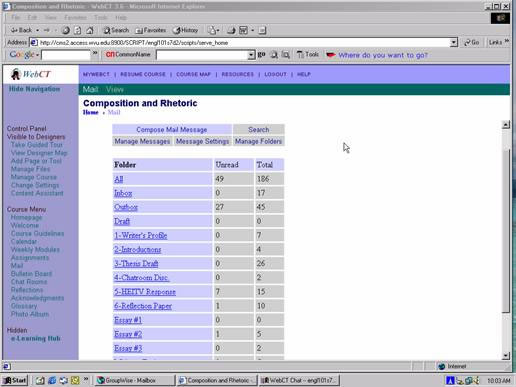
Completing this series not only means that students have acquired or confirmed that they already have the necessary tech skills but they have practiced communication skills that they will need for future higher-stakes assignments. What technologies are needed to meet course goals? In order to brainstorm ways in which the courses could provide a wide range of learner-content, learner-learner, and learner instruction interaction, I made a list of all of the communication tools I could think of that I had used in the physical writing classroom to meet the course goals. Some of the items on my list included lecture, paper exchange, peer feedback, conferencing with me, small group discussion, large group discussion, synchronous communication, asynchronous communication, and visual content. I then reviewed the tools available to me through WebCT and other, more conventional platforms of communication (like the telephone and my office) to see how I could make sure that I was choosing technological tools that would help me accomplish a range of interactive opportunities for students. Here is the list I generated:
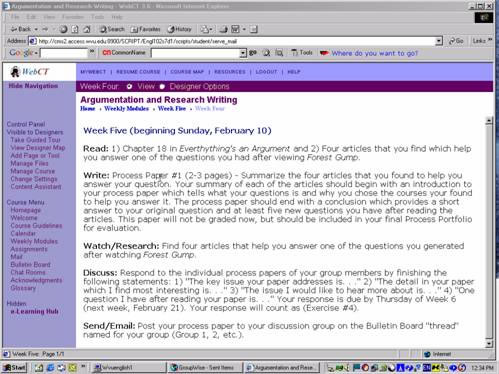
In addition, WebCT allowed me to add a couple venues for communicating: the on-line grade book, which students can check at anytime to see all of the grades I have recorded for them, and the on-line calendar which allows me to link reminders to other course content included in the course site. For example, if I want to send a reminder to start preparing the final portfolio, I can link to the description of the portfolio in the "Course Guidelines" content module or to an essay I have put up on the site that describes the purpose of the portfolio. Figure 1: List of Bulletin Board “Topics” [return to text]. What technologies will allow me to maximize the "anywhere" / "anytime"-ness that was one of our primary reasons for adapting the courses for the Web? Because the impetus for creating the courses I was working on was to give adult learners who were constrained by time and/or distance a way to take college-level writing courses while fulfilling many other work and family commitments, maximizing the real-time flexibility of the courses was another key criterion in choosing course technologies. Some of the technologies I chose not to use that might have otherwise allowed for limited interactivity among students and the course instructor included video conferencing and software for sale with some of the textbook publishers that allows for electronic essay exchange and comments. I did not use either of these, however, because they would not have allowed me to streamline the means of delivery, keep costs down for students, and maximize the "anywhere"/ "anytime"-ness that was one of our primary reasons for designing courses for the web in the first place. Via the WebCT Course Management System (CMS), weekly work (or the group of "action items" students needed to complete for the week) was assigned to be completed each week by five p.m. on Thursday to allow for some flexibility in work preparation. Action items were listed in the same order every week, to make following the assigned course work easier (Figure 2). I also chose not to use streaming video presentations after experimenting with student capabilities to access video through the course web-site with one brief video "Welcome Note" from me on the course "Welcome Page." After finding that, due to slow modem speeds and other factors, nearly two thirds of students could not view the video, I decided to discontinue the video "notes." I will continue to test this and will add more video notes when I find that most students are able to access them.
Figure 2: Weekly “Action Items”
|
|
|
©2006 Catherine Gouge |